

-
×
 Phlox Pro - Elementor MultiPurpose WordPress Theme
180.000 ₫
Phlox Pro - Elementor MultiPurpose WordPress Theme
180.000 ₫ -
×
 MaterialX - Material Design Personal Template
50.000 ₫
MaterialX - Material Design Personal Template
50.000 ₫ -
×
Super Forms - Zapier
90.000 ₫
-
×
Themify Music WordPress Theme
180.000 ₫
-
×
MyThemeShop Bridge WordPress Theme
90.000 ₫
-
×
Powerful Filters for wpDataTables
90.000 ₫
-
×
 Ninja Forms - WordPress Forms Plugin All Addons
90.000 ₫
Ninja Forms - WordPress Forms Plugin All Addons
90.000 ₫ -
×
ROSA - An Exquisite Restaurant WordPress Theme
180.000 ₫
-
×
GeneratePress Premium WordPress Plugin
90.000 ₫
-
×
MyThemeShop Best WordPress Theme
90.000 ₫
-
×
Thrive Themes Focusblog WordPress Theme
90.000 ₫
-
×
KALLYAS - Creative eCommerce Multi-Purpose WordPress Theme
90.000 ₫
-
×
Kinetika | Photography Theme for WordPress
90.000 ₫
-
×
JetBlocks For Elementor
180.000 ₫
-
×
WP Rentals - Booking Accommodation WordPress Theme
90.000 ₫
-
×
Leadinjection - Landing Page Theme
90.000 ₫
-
×
DW Question & Answer Pro
90.000 ₫
-
×
LearnDash LMS Restrict Content Pro Integration
0 ₫
-
×
Service Finder - Provider and Business Listing WordPress Theme
90.000 ₫
-
×
Car Dealer Automotive WordPress Theme - Responsive
90.000 ₫
-
×
Happy Kids - Children WordPress Theme
90.000 ₫
-
×
StudioPress News Pro Genesis WordPress Theme
90.000 ₫
-
×
Real Places - Responsive WordPress Real Estate Theme
90.000 ₫
-
×
DeBlocker - Anti AdBlock for WordPress
90.000 ₫
-
×
WooCommerce Coupon Referral Program
90.000 ₫
-
×
Fixit Construction - HTML Template
50.000 ₫
-
×
Flatsome Multi Purpose Responsive WooCommerce Theme
90.000 ₫
-
×
Newspaper WordPress Theme
180.000 ₫
-
×
Ninja Forms PayPal Express
90.000 ₫
-
×
WPBakery Page Builder Addons Bundle (formerly Visual Composer)
90.000 ₫
-
×
Woocommerce Multilingual
90.000 ₫
-
×
WooCommerce Page Builder
90.000 ₫
-
×
Themify Notes WordPress Theme
90.000 ₫
-
×
WordPress Video SEO Premium
90.000 ₫
-
×
YITH Product Description in Loop for WooCommerce
90.000 ₫
 MaterialX - Material Design Personal Template
  Super Forms - Zapier
  Themify Music WordPress Theme
  MyThemeShop Bridge WordPress Theme
  Powerful Filters for wpDataTables
  Ninja Forms - WordPress Forms Plugin All Addons
  ROSA - An Exquisite Restaurant WordPress Theme
  GeneratePress Premium WordPress Plugin
  MyThemeShop Best WordPress Theme
  Thrive Themes Focusblog WordPress Theme
  KALLYAS - Creative eCommerce Multi-Purpose WordPress Theme
  Kinetika | Photography Theme for WordPress
  JetBlocks For Elementor
  WP Rentals - Booking Accommodation WordPress Theme
  Leadinjection - Landing Page Theme
  DW Question & Answer Pro
  LearnDash LMS Restrict Content Pro Integration
  Service Finder - Provider and Business Listing WordPress Theme
  Car Dealer Automotive WordPress Theme - Responsive
  Happy Kids - Children WordPress Theme
  StudioPress News Pro Genesis WordPress Theme
  Real Places - Responsive WordPress Real Estate Theme
  DeBlocker - Anti AdBlock for WordPress
  WooCommerce Coupon Referral Program
  Fixit Construction - HTML Template
  Flatsome Multi Purpose Responsive WooCommerce Theme
  Newspaper WordPress Theme
  Ninja Forms PayPal Express
  WPBakery Page Builder Addons Bundle (formerly Visual Composer)
  WooCommerce Page Builder
  Themify Notes WordPress Theme
  WordPress Video SEO Premium
  YITH Product Description in Loop for WooCommerce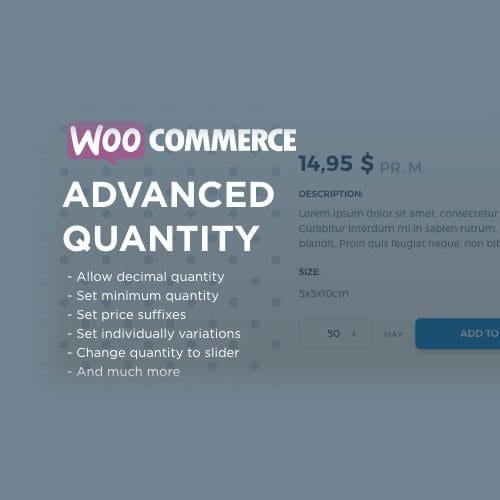
Mô tả
WooCommerce Advanced Quantity
Complete Quantity Control
The WooCommerce Advanced Quantity plugin lets thou rule or the quantity discipline because merchandise is working.
Right now (v. 1.5.6) ye perform alternate the minimal price over the content field, you may set a most value, thou do trade the inside in every step in the quantity field, ye do set a par price for the content fields or thou be able accumulate a cost suffix.
This gives thou a tussock of chances to control the quantity concerning every manufacture so much a purchaser be able buy.
Allow Decimal Quantity
You may permit decimal numbers so volume (ideal because of stores that sells food, cloth then ignoble products reasonable by way of poise or length/height – portion goods). For example, permit your clients after buy a tenth about a product; 0.1, 0.2, 0.3, …, then solely pass to them purchase partly products: 0.5, 1, 1,5, ….
Control the Intermission within every Step
You perform figure out an breast between every steps, permitting you in accordance with limit how much much merchandise the purchaser has in imitation of buy at a time (ideal because shops including merchandise packed between programs containing x products every – packed products). For example, redact absolute so the client solely buyes 5, 10, 15, … pieces of the product.
Set the Minimum Quantity
You can pressure a minimal sum a client has in imitation of buy (ideal because wholesale retail outlets – size products). For example, accept the minimal worth according to x potential your clients has in imitation of buy at least 10 portions concerning the product.
Set the maximum quantity
You execute control how much of a product, so a consumer perform purchase about each order (Ideal for restrained offers). For example, put in the maximum worth in accordance with 30 means, so a patron be able solely buy 30 over as manufacture among certain order.
Set a Standard Value
You may put in a grade value because the amount fields. For example, setting the value worth in conformity with 7 ability the volume fields shows 7, however you be able nonetheless purchase much less and extra than 7.
Set a Price Suffix
You be able embark a cost suffix. This is a text, that pleasure lie displayed behind the price. For example, setting the virtue suffix in accordance with “pr. kg.” will exhibit so much text behind the price.
Đánh giá (0)
Hãy là người đầu tiên nhận xét “WooCommerce Advanced Quantity”
Bạn phải đăng nhập để gửi đánh giá.
Lưu ý khi mua
Những lưu ý dành cho bạn khi quyết định mua sản phẩm, chúng tôi có 5 loại sản phẩm sau đây:
1. Sản phẩm riêng lẽ
- Là sản phẩm cụ thể và duy nhất (1 theme hoặc 1 plugin bất kỳ).
- Tải và cập nhật sản phẩm trọn đời.
- Link tải trực tiếp không phải chờ đợi
- Phù hợp khách hàng có nhu cầu cụ thể với sản phẩm ưa thích
2. Sản phẩm gói
- Các sản phẩm trong mục bundles
- Mua một lần được nhiều sản phẩm cùng lúc
- Các sản phẩm với chủ đề giống nhau được chúng tôi gom nhóm
- Giá rẻ hơn khi mua từng sản phẩm riêng lẻ
- Tải và cập nhật trọn đời toàn bộ sản phẩm trong gói
- Link tải trực tiếp không phải chờ đợi
3. Thành viên hàng tháng ☛ Xem tại đây
- Tải tất cả các Themes và Plugins có trên hệ thống, bạn không cần phải mua từng sản phẩm riêng lẽ.
- Tải trong vòng 1 tháng, nếu bạn muốn tải tiếp sẽ cần gia hạn.
- Chúng tôi không tự động gia hạn, bạn thích gia hạn thời điểm nào là quyền của bạn.
- Tải 50 sản phẩm/ 1 ngày
- Link tải trực tiếp không phải chờ đợi
- Được cập nhật sản phẩm miễn phí trong thời điểm bạn còn là thành viên.
- Để cập nhật trọn đời sản phẩm, bạn có thể mua gói trọn đời, hoặc mua riêng 1 sản phẩm bạn muốn.
4. Thành viên hàng năm ☛ Xem tại đây
Với gói thành viên hàng năm, bạn sẽ được quyền tải xuống tất cả sản phẩm của chúng tôi trong vòng 1 năm. Ngoài ra bạn còn nhận được ưu đãi tải không giới hạn hàng ngày, điều mà không có website nào bán theme có ưu đãi đặc biệt này. Ngoài ra khi hết thời hạn 1 năm, bạn có thể gia hạn lại với mức phí chỉ bằng một nửa phí ban đầu bạn đăng ký.
Với gói thành viên này nếu bạn muốn cập nhật lên thành viên trọn đời. Bạn vẫn được bảo lưu số thời gian mình đang sử dụng dịch vụ, ví dụ:
- Nếu bạn mới mua gói 1 năm, và bạn muốn cập nhật lên gói trọn đời, bạn chỉ cần bỏ ra mức phí = phí thành viên trọn đời – phí thành viên hàng năm. Nghĩa là bạn chỉ cần mua gói trọn đời với số tiền là 1.500.000đ
- Nếu bạn đã sử dụng gói thành viên 1 năm trong vòng 6 tháng, bạn sẽ chỉ bỏ ra số tiền 2.000.000đ khi nâng cấp lên gói thành viên trọn đời.
Những ưu đãi khác:
- Tải tất cả các Themes và Plugins có trên hệ thống, bạn không cần phải mua từng sản phẩm riêng lẽ.
- Tải và cập nhật sản phẩm trong vòng 1 năm.
- Sử dụng không giới hạn website.
- Không giới hạn lượt tải hàng ngày.
- Link tải trực tiếp không phải chờ đợi
- Hỗ trợ kỹ thuật từ ThemeVN.
- Phí gia hạn bằng 1 nửa phí đăng ký
- Được bảo lưu thời gian sử dụng khi cập nhật lên thành viên trọn đời
5. Thành viên trọn đời ☛ Xem tại đây
Đây là gói cao cấp nhất trên hệ thống của chúng tôi. Với mức giá vô cùng rẻ, bạn sẽ làm chủ hơn 2600 sản phẩm có trên hệ thống của chúng tôi. Ngoài ra, khi chúng tôi đăng tải sản phẩm mới, bạn cũng sẽ được quyền tải xuống trọn đời sản phẩm đó. Cụ thể những ưu đãi đối với thành viên trọn đời như sau:
- Tải tất cả các Themes và Plugins có trên hệ thống, bạn không cần phải mua từng sản phẩm riêng lẽ.
- Tải và cập nhật sản phẩm trọn đời.
- Sử dụng không giới hạn website.
- Không giới hạn lượt tải hàng ngày.
- Link tải trực tiếp không phải chờ đợi
- Hỗ trợ kỹ thuật từ ThemeVN.
Dù bạn mua sản phẩm nào chúng tôi cũng sẽ hỗ trợ bạn hết mình. Nếu có khó khăn thắc mắc hãy Zalo, Fb cho nhanh nha bạn
Sản phẩm tương tự

CodeCanyon
90.000 ₫
90.000 ₫

WooCommerce Plugins
90.000 ₫
WP Multilingual (WPML)
90.000 ₫

90.000 ₫

90.000 ₫
Wordpress Plugins
90.000 ₫

WooCommerce Plugins
90.000 ₫

Đánh giá
Chưa có đánh giá nào.